Computer Vision Syndrome Relief for Screen-Heavy Workplaces.
Overhead glare from fluorescent and LED office lighting makes digital eye strain significantly worse. NaturaLux filters reduce that overhead glare by 90%. No electrician. No fixture replacement.

Used in offices, schools, and clinics across the U.S. and Canada





















Understanding Computer Vision Syndrome
Computer vision syndrome, also called digital eye strain, is a common workplace problem caused by prolonged screen use and aggravated by harsh overhead lighting. NaturaLux™ full-spectrum light filters by Make Great Light help reduce glare from fluorescent and LED office fixtures, making office environments more comfortable for screen-heavy work.
According to a 2025 systematic review published in PubMed Central (PMC11901492), roughly 69% of heavy screen users experience CVS symptoms. The American Optometric Association (opens in new tab) defines it as eye and vision-related problems resulting from prolonged computer, tablet, e-reader, and cell phone use.
Most coverage focuses entirely on the screen. That advice is correct but incomplete. The other half of the problem is the room around you. Harsh overhead fluorescent or LED office lighting creates glare that reflects directly onto your screen and into your eyes all day. Your visual system has to cope with near-focus screen strain and constant overhead glare at the same time. That combination drives workplace eye strain from mild to severe.
NaturaLux light filters address the overhead lighting side of the equation. They do not replace screen habits or medical care. They remove one major environmental contributor that most CVS guidance completely ignores.

Common Computer Vision Syndrome Symptoms
Common computer vision syndrome symptoms include blurred vision, dry eyes, headaches, glare sensitivity, and fatigue during or after screen-heavy work. Symptoms group into three categories below. If you are experiencing three or more by mid-afternoon, your environment is likely contributing.
Visual Symptoms
- Blurred vision (near or distance)
- Double vision
- Difficulty refocusing between screen and surroundings
- Light sensitivity (photophobia)
- Halos or glare around light sources
Ocular Symptoms
- Dry eyes
- Watery or teary eyes
- Burning or stinging sensation
- Redness and irritation
- Itching or the urge to rub your eyes
Systemic Symptoms
- Headaches (frontal or temporal)
- Neck and shoulder tension
- General fatigue by mid-afternoon
- Difficulty concentrating
- Irritability or low mood toward end of workday
Simple self-check: If you are experiencing three or more of these symptoms by 3pm on a typical workday, your environment is likely contributing to CVS. Start by looking up at your overhead lighting and asking how bright and harsh it feels compared to the comfortable glow of your screen.
NaturaLux filters address the overhead lighting side of the equation. See which filter fits your fixture →
Light Filters for Computer Vision Syndrome Relief
NaturaLux filters help reduce overhead glare from fluorescent and LED office fixtures, making them a practical solution for offices dealing with computer vision syndrome and digital eye strain. No electrician. No fixture replacement.
30,000+ installed in offices, schools, and healthcare facilities.
Office Light Covers That Eliminate Glare
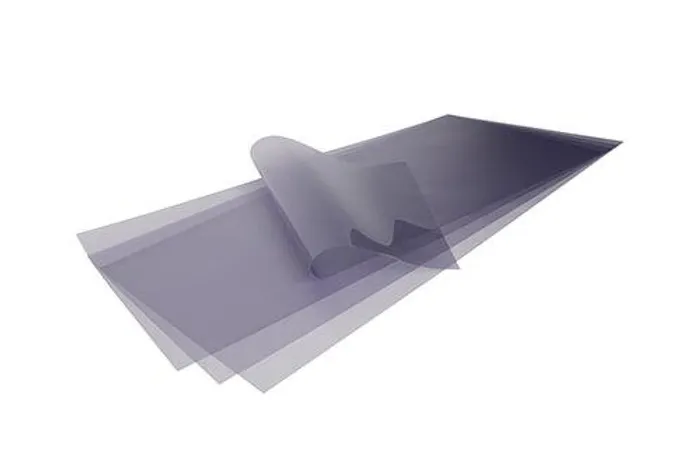
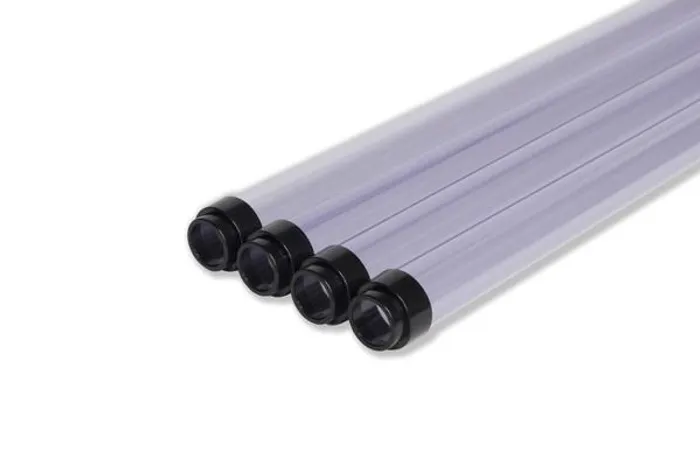
NaturaLux filters work with both LED troffers and fluorescent fixtures. No replacement, no electrician, no disruption. Choose the type that matches your ceiling.
What Makes Computer Vision Syndrome Worse at Work
For many people, workplace eye strain is not caused by screens alone. What makes computer vision syndrome worse in offices is the combination of prolonged screen use and harsh overhead fluorescent or LED lighting. Most guides cover the first three causes below. The last two are where office lighting becomes a significant and fixable part of the problem.
Prolonged Near Focus
Your ciliary muscles contract to keep the lens curved for close vision. Hours of near-focus work without breaks fatigues these muscles, causing blur and aching.
Reduced Blink Rate
Screen users blink up to 66% less often than normal. Reduced blinking means less tear film renewal, leading to dry, burning, and watery eyes within hours.
Screen Glare and Contrast
Uncalibrated screens with high brightness, low contrast, or poor viewing angles make text harder to read and force your eyes into constant micro-adjustment.
Fluorescent Overhead Glare
Harsh fluorescent fixtures create glare that reflects off screens, desks, and surrounding surfaces all day. Your eyes must constantly compensate, adding a second layer of strain on top of screen work.
Harsh LED Retrofits
Many offices replaced fluorescents with cheap LED panels that produce intense blue-white output and concentrated glare. LEDs eliminate flicker but can make overhead glare and color temperature mismatch worse.
Flicker (Older Systems)
Magnetic ballast fluorescents flicker at 100-120Hz. You cannot consciously see it, but your visual system detects it. Even imperceptible flicker adds measurable fatigue over an 8-hour shift.
The first three causes are screen-side and require behavioral or ergonomic changes. The last two are environment-side, caused by fluorescent office lighting and harsh LED panels, and can be addressed by modifying the overhead fixtures. Most workplaces address neither. NaturaLux filters specifically target the overhead glare, color temperature mismatch, and flicker effect that medical articles about CVS rarely mention. For more on how office overhead lighting affects eye health, see our fluorescent light headaches page and office lighting solutions guide.
How to Reduce Computer Vision Syndrome at Work
CVS responds to a layered approach. Start with the behavioral changes because they cost nothing. Then address the environment, which is where most workplaces stop short.
The 20-20-20 Rule
Every 20 minutes, look at something at least 20 feet away for at least 20 seconds. This relaxes the ciliary muscles that stay contracted during close-focus screen work and gives your visual system a brief recovery window. Use a timer, phone app, or browser extension to build the habit. This is the single most cited behavioral recommendation from optometrists for CVS, and it costs nothing to start today.
Adjust Your Screen
Position your screen 20-28 inches from your eyes, slightly below eye level (10-15 degrees). Increase text size until you can read comfortably without leaning in. Reduce screen brightness to match the brightness of the room around you (not brighter, not significantly dimmer). Turn on Night Mode or reduce color temperature to warmer settings in the evening. Anti-glare screen covers can also help if your monitor has a glossy finish.
Blink Consciously and Use Lubricating Drops
Screen use drops your blink rate by up to 66%. Consciously remind yourself to blink fully (not half-blinks) every few minutes, especially during intensive focus tasks. Preservative-free artificial tears used once or twice during a long work session can significantly reduce dry eye symptoms. Consult your optometrist if dryness is severe or persistent, as it may indicate secondary dry eye disease.
Consider Computer Glasses
If you wear glasses or contacts, tell your optometrist you are experiencing CVS. Computer-specific prescriptions optimize the intermediate (arm's length) focal distance rather than the near-distance (reading) or far-distance (driving) settings most prescriptions cover. Anti-reflective coatings on lenses are well-supported for reducing screen-related glare. Blue-light filtering lenses are optional; current evidence is mixed on whether they provide significant additional benefit for CVS specifically.
Fix Your Lighting Environment
This is the step most CVS articles skip. Overhead lighting creates a compound effect on screen-related eye strain that behavioral interventions alone cannot fully address. Four changes make the biggest difference:
Reduce Overhead Glare
Glare from ceiling fixtures reflects off screens and desk surfaces all day. Full-spectrum light filters installed over fluorescent or LED fixtures reduce overhead glare by 90% without replacing or dimming the fixture.
Diffuse the Light Source
Undiffused fluorescent or LED fixtures direct intense light straight down, creating harsh bright patches. NaturaLux filters spread and soften that output, reducing the visual stress caused by the sharp contrast between bright ceiling spots and shadowed work surfaces.
Match Color Temperature
Most screens are set to 6500K or lower. Many overhead LEDs produce 5000-6500K cool blue-white light. NaturaLux filters improve color rendering to CRI 95.3, shifting output toward a more natural daylight balance that reduces the mismatch between screen and ambient light.
Minimize Flicker
NaturaLux filters do not eliminate the electrical flicker from magnetic ballast fluorescents. But by softening total light output and correcting the spectrum, they may reduce the perceived effect of flicker on your visual system.
How Long Does CVS Take to Go Away?
For most people, symptoms resolve within a few hours to one day once the triggering conditions are removed or reduced. Dry eye and blurred vision typically clear first. Headaches that have built over a long shift may linger until the following morning.
If you have been working in a harsh lighting environment for months or years without addressing it, recovery may take longer. Chronic dry eye in particular can persist even after the causative factors are removed, because the tear film production can be disrupted over time. In those cases, lubricating drops and, if symptoms persist, a consultation with an optometrist are appropriate.
Symptoms will return if the environmental factors are not corrected. CVS is a repetitive strain condition: as long as the triggers are present, the strain will continue to accumulate.
When to See a Doctor
Most CVS symptoms respond to the environmental and behavioral interventions above. See an eye doctor if you experience any of the following:
- Sudden or unexplained changes in vision
- Eye pain that does not resolve after rest
- Persistent double vision
- Symptoms that do not improve after addressing the screen and lighting environment
- A new prescription may be needed (common in adults over 40)
Important: NaturaLux filters are an environmental modification, not a medical treatment. They address the overhead lighting contribution to CVS symptoms and do not replace professional eye care. If symptoms persist after addressing your environment, consult an optometrist.
Computer Vision Syndrome in Offices, Schools, and Healthcare Settings
CVS is most common in environments where people spend full shifts at screens under overhead fluorescent or LED fixtures they have no control over.
Open-Plan Offices
Rows of ceiling troffers over rows of monitors. Workers cannot adjust the overhead lighting, and ambient glare reflects directly into their screens for the entire shift. Fluorescent office lighting and harsh LED panels intensify digital eye strain throughout the workday in ways individual behavior changes alone cannot fix.
Classrooms and Schools
Students and teachers spend 6-8 hours under institutional fluorescent lighting while reading, writing, and viewing screens. The overhead glare from strip fixtures combines with screen-based learning to create exactly the compound strain pattern that makes CVS worse. Fixture-level solutions scale across an entire room without individual adjustments.
Healthcare and Clinical Settings
Nurses, doctors, and clinical staff document on screens under high-intensity overhead lighting for full shifts. The combination of medical-grade fluorescent or LED overhead fixtures and EHR screen work creates sustained eye strain across long shifts. Overhead lighting at the fixture level is often the only practical intervention in clinical environments.
Related Conditions Linked to Harsh Office Lighting
If overhead office lighting is contributing to your eye strain, it may be involved in other symptoms too. These lighting-related conditions share the same environmental triggers.
Fluorescent Light Headaches
Headaches that build throughout the day under overhead fluorescent fixtures.
Read moreLight Sensitivity
General photosensitivity and discomfort in brightly lit environments.
Read moreMigraines
Overhead glare as a documented migraine trigger in workplace environments.
Read moreLED Light Headaches
Headaches and eye strain caused by harsh LED fixtures after fluorescent replacement.
Read moreFrequently Asked Questions About Computer Vision Syndrome
What causes computer vision syndrome?
What are the symptoms of computer vision syndrome?
Can you fix computer vision syndrome?
How long does computer vision syndrome take to go away?
What is the 20-20-20 rule?
Can office lighting make computer vision syndrome worse?
What type of light filters help with digital eye strain?
Do NaturaLux filters work with LED office lights?
How quickly can lighting changes improve computer vision syndrome symptoms?
Is computer vision syndrome permanent?
Screens and lighting together cause CVS. Fix the half you can control today.
NaturaLux filters install directly over your existing fluorescent or LED fixtures with no electrician and no tools. 30,000+ installed. Immediate improvement on day one.