6 Effective Ways To Block Fluorescent Lighting at Work
Office lights too bright? Six ways to block or soften fluorescent and LED lighting at work, from screen placement to filters, and when to call maintenance.

Overhead fluorescent and LED lighting is a common complaint in offices, but most glare problems have a specific cause and a practical first step. This guide covers six ways to block or soften fluorescent lighting at work, when a compatible filter helps, and when the right answer is a maintenance ticket or a conversation with HR. NaturaLux™ professional-grade full-spectrum light filters by Make Great Light are one fixture-level option for compatible working lights. For enclosed fluorescent troffers, see Fluorescent Light Covers.
Quick answer: The best way to reduce glare from bright office lights depends on where the glare comes from. Reposition a screen to remove reflections. Use installed controls, zoning, or task lighting for over-lit or uneven areas. Report flicker and buzzing for repair. Add a compatible diffuser or filter when a working fixture is still harsh. Persistent or individual symptoms may call for an accommodation request or an eye-care evaluation.
Do You Have Fluorescent Light Sensitivity?
Sensitivity to overhead light may show up as squinting, dry or blurry eyes, headaches, or trouble focusing, especially after hours of screen work. A bright fixture reflected on a monitor can compound the problem.
Glare from overhead fixtures is a common complaint. NaturaLux filters reduce glare by 90% on compatible fixtures. For broader information about lighting-related discomfort, see office lighting headache solutions.
What are the best ways to reduce glare from bright office lights?
The best solutions for reducing glare from bright office lights are ranked by the problem they solve, not by one universal product.
- Reflected glare on a screen or desk: reposition and tilt the monitor, then manage window reflections with blinds. This is the first step and requires no product.
- Poor distribution or harsh contrast: use dimming or zoning if the system supports it, or add diffuse task or indirect light.
- Buzzing or visible flicker: report it. A failing lamp, ballast, or LED driver needs qualified repair. A cover or filter does not fix an electrical fault.
- A working fixture that is still harsh: add a compatible diffuser or light filter. NaturaLux™ full-spectrum light filters by Make Great Light reduce glare by 90% while retaining 80% of real-world light output.
- Symptoms that persist or are specific to one person: request an individual accommodation and consider a professional eye-care evaluation.
| Source of glare | Best first step | When a filter may help | When another response is needed |
|---|---|---|---|
| Direct glare from a functional fixture | Shield the source or change seating angle | The fixture works but is harsh and the filter is compatible | The fixture is unsuitable, unsafe, or excessive for the task |
| Light reflected on a monitor | Reposition and tilt the monitor | Reflection remains after reasonable layout changes | The layout cannot change and glare blocks the task |
| Window glare | Use blinds or tints and reorient the desk | Not a fixture-filter problem | Shading cannot control the solar glare or heat |
| Uneven light or strong contrast | Use task light, indirect light, or zoning | The bright zone is also harsh | The layout leaves dark zones that local lighting cannot fix |
| Buzzing or visible flicker | Submit a maintenance ticket | Only after repair if the working fixture remains harsh | Repair the lamp, ballast, or driver |
| Migraine, photophobia, dry eye, or vision concern | Talk with HR and an eye-care provider | May be one part of an accommodation plan | Symptoms persist regardless of lighting changes |
How To Dull or Block Fluorescent Lights In Office
Modify the environment in a logical order. These six actions start with free layout changes, separate maintenance problems from glare problems, and leave filtering for a functional fixture that still needs softer light.
Option #1 Make The Most of Natural Lighting
Daylight can support visual comfort when it is controlled. Sit where daylight reaches the work area without landing directly on the screen. Check the position at different times of day because late-afternoon sun and reflections from nearby buildings can create more glare than the overhead fixture. Use blinds or window treatments when needed.
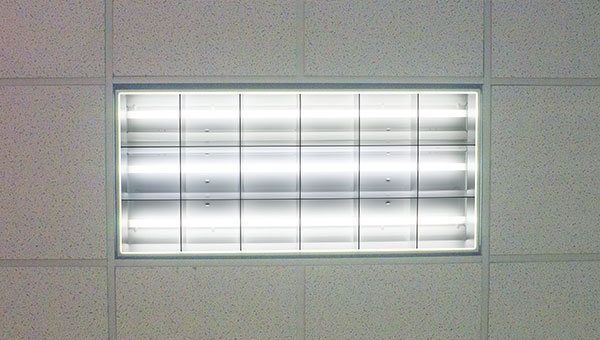
Light covers can reduce glare from overhead fixtures and improve color rendering. Match the filter to the fixture type.
Option #2 Reposition Your Screen and Workstation
Overhead glare often reaches the eye by reflecting off a monitor. Turn the screen off and move it until no overhead fixture or window appears in the dark surface. Tilt it slightly downward, set brightness to match the room, and consider a matte screen or hood if reflections remain. A low partition or monitor hood can block the reflection path when the desk cannot move.
Option #3 Ask for Controls, Task Lighting, or Gentler Lamps
Ask facilities whether the zone can be dimmed, switched in banks, or scheduled. A task lamp can light the desk from the side instead of relying only on overhead light. When lamps are already due for replacement, facilities can evaluate a lower-output or different-color option that remains compatible with the fixture and applicable requirements. Turning off every light is not a reliable workplace plan.
Option #4 Take Breaks With the 20-20-20 Rule
The 20-20-20 rule is a simple screen-break habit: every 20 minutes, look at something about 20 feet away for at least 20 seconds. It does not change the fixture, but it gives focusing muscles a short break during extended computer work.
Option #5 Consider Tinted or Light-Sensitivity Glasses
Some people with migraine or photophobia find a brimmed visor or professionally selected tinted lenses helpful. Talk with an eye-care provider about whether a tint is appropriate for your situation. Glasses do not repair flicker or correct a failed fixture.
Option #6 Add Fluorescent or LED Light Filters
If the fixture works but remains harsh after the steps above, a filter changes the light at the source for everyone under it. NaturaLux™ full-spectrum light filters by Make Great Light install on compatible fluorescent troffers, LED panels, and exposed tubes without rewiring. They reduce glare by 90%, retain 80% of real-world light output, improve CRI from 88 to 95.3, and block 100% of UVB and up to 98% of UVA from fluorescent fixtures. Applicable flat-panel filters are Class A under ASTM E84-17 as classified by NFPA 101, with FSI 20 and SDI 20.
A filter does not eliminate all glare, repair a failed ballast or driver, fit every fixture, or replace medical care. If a light flickers or buzzes, start with qualified repair. Read how fluorescent-light flicker causes headaches for the electrical distinction.
Choose by fixture type: Fluorescent Light Covers for enclosed fluorescent troffers, LED Light Filters for flat LED panels, and Fluorescent Tube Covers for exposed T5, T8, or T12 tubes.
Other Ways To Block Fluorescent Lighting
Do Not Wear Sunglasses Indoors
Very dark sunglasses indoors can increase dark adaptation, which may make ordinary light feel brighter when the glasses come off. If ordinary office light causes persistent discomfort, discuss the pattern with an eye-care provider and use an accommodation process rather than relying on progressively darker lenses.
Frequently asked questions
What are the best solutions for reducing glare from bright office lights?
Match the fix to the glare source: reposition your monitor for reflections, use dimming or task lighting for harsh contrast, report flicker for repair, add a compatible light filter to a working fixture that is still harsh, and seek an accommodation or eye-care evaluation if symptoms persist.
How do I block fluorescent lights at work without turning them off?
Shield or diffuse rather than block. Reposition your screen, ask for zone dimming or a task lamp, and use a compatible fluorescent light cover or LED filter on the fixture. Fully covering a fixture with improvised material can leave too little task light and may create a fire hazard.
Do light filters fix flickering fluorescent lights?
No. Flicker and buzzing can come from a failing lamp, ballast, or LED driver and need qualified repair. A passive filter changes glare and spectrum on a working fixture only.
Can I ask my employer to change the lighting?
Yes. Start with facilities for maintenance, controls, or a task lamp. If you have a medical condition affected by light, an individual accommodation request through HR is the usual path.
Which light filter fits my office fixture?
Enclosed fluorescent troffers take Fluorescent Light Covers, flat LED panels take LED Light Filters, and exposed T5, T8, or T12 tubes take Tube Covers. Use Find My Filter if you are unsure.
Creating a Conducive Indoor Environment for Work
Most office glare problems are best handled in this order: reposition, adjust, repair, filter, then accommodate. Start with layout and controls, escalate visible flicker or buzzing to maintenance, and test a compatible filter on one fixture or one room before asking facilities to change a whole floor.
For individual needs and the request process, see the workplace accommodations guide for light sensitivity.
Sources
Canadian Centre for Occupational Health and Safety: Lighting Ergonomics, General
American Academy of Ophthalmology: Computer usage and eye-strain tips
Peer-reviewed office-lighting survey: Subjective and objective evaluation of office lighting
Stop the headaches at the source
Browse filters ready to ship, or get a custom quote for your space.